1
Paste Link
Copy a publicly accessible webpage URL or a direct GIF link from platforms like Twitter, Reddit, Pinterest, Giphy, or Tenor, then paste it into the downloader.
Click image to enlarge
Need a quick GIF download? Our free online GIF downloader lets you save animated GIFs from public pages on Twitter, Reddit, Pinterest, Giphy, and Tenor. Paste a GIF URL or a publicly accessible webpage link and download the GIF in high quality no signup required. Always respect copyright and only download content you have the right to use.
Instant Downloads
No waiting, no delays
Safe & Secure
No malware
High Quality
Original GIF quality
All Platforms
Giphy, Tenor, Twitter & more
Enter the URL below to download your favorite GIF
Enter a public Twitter, Reddit, or webpage URL to find GIFs you have the right to download
Your GIF preview will appear here
Enter a URL and click 'Extract GIFs' to preview
Downloading animated GIFs should be effortless. Our Free Online GIF Downloader helps you save GIFs from publicly accessible webpages and social media links in a few clicks. No registration, no watermark, and no software installation required. Use it for reaction GIFs, blog animations, or media shared on public pages — and only download content you have the legal right to use. The tool is free for personal, lawful use.
While many online GIF downloaders are available, not all of them offer a smooth, reliable, and secure experience. Some tools are slow, filled with unnecessary ads, or make downloading more complicated than it needs to be. That's why we built our online GIF downloader with a different approach. It is designed to be simple, fast, and easy for anyone to use. Just paste the GIF link, start the download, and save your favorite GIF in seconds—no technical knowledge, complicated steps, or unnecessary distractions required. Whether you're saving GIFs for personal use, presentations, social media, or creative projects, our tool helps you download them quickly and efficiently.
Downloading GIFs is quick and straightforward. Simply paste the GIF page URL into the tool, let it extract the available GIFs, and download the ones you need in their original quality. There are no complicated settings, unnecessary pop ups, or extra steps. Just a fast, clean, and user friendly process that helps you save GIFs in only a few clicks while preserving their original resolution and animation quality.
There are no hidden charges, free trials, or premium restrictions to worry about. Every feature is available without unexpected costs or paywalls, so you can download GIFs whenever you need them. Our goal is to provide a simple, transparent, and hassle-free experience that lets you focus on saving your favorite GIFs instead of dealing with subscriptions or limitations.
You can use our GIF downloader without creating an account or providing your email address. We do not ask for unnecessary personal information, making the process simple, fast, and privacy friendly. Just open the tool, paste your link, and download the GIFs you need without sharing personal details.
Every downloaded GIF keeps its original animation frames and image quality intact. The tool preserves smooth motion, sharp details, and the original resolution, so your GIF looks exactly as it was intended. Whether you use it for social media, presentations, design work, or personal projects, you can expect high quality results without losing important visual details.
Our GIF downloader works smoothly across all major devices and platforms, including Windows, Mac, iPhone, and Android. It is also compatible with modern web browsers, allowing you to download GIFs without installing any software or extensions. Simply open the tool in your preferred browser, paste the link, and start downloading from almost any device.
Your GIF links are processed quickly to provide fast downloads without unnecessary waiting. We do not permanently store your downloaded files, helping protect your privacy and keeping the process simple, secure, and efficient. Once your download is complete, you can save your GIF and continue without worrying about your files being kept on our servers.
To download a GIF, copy the link of the page or GIF, paste it into the box above, click Extract GIFs, then press Download. On a computer you can also right-click a GIF and choose Save image as. If the file saves as a still image or video, use this tool instead.
Copy a publicly accessible webpage URL or a direct GIF link from platforms like Twitter, Reddit, Pinterest, Giphy, or Tenor, then paste it into the downloader.
Click image to enlarge
Click Extract GIFs to scan the page and find available animations. Preview the results so you can choose the exact GIF you want before saving anything.
Click image to enlarge
Download a single GIF or save multiple files as a ZIP in their original quality. No signup is required, and everything runs directly in your browser.
Click image to enlarge
Most people assume every animated image online is a real GIF file, but that is rarely true anymore. Giphy, Tenor, Twitter and Instagram often serve their animations as compressed video files because they load faster and take up less space on a server. When you paste a link into our tool, it does not just grab whatever file sits at that URL. It checks the page source, finds the actual media reference, and figures out whether the source is a true GIF or a disguised video clip.
If the source turns out to be a video, the tool converts it back into a proper looping GIF before handing it to you. That conversion step is what trips up a lot of free online tools, which is also the reason a GIF sometimes downloads as an MP4 video file when you try other methods. If you actually want to convert existing GIFs into lightweight video format for websites or social feeds, you can use our dedicated GIF to MP4 converter.
Once your GIF is downloaded, you might find that high-frame-rate animations or large resolutions take up too much storage or exceed upload limits on platforms like Discord or Slack. In that case, our free GIF compressor lets you reduce file sizes by up to 85% while preserving visual clarity, transparent backgrounds, and smooth motion.
Additionally, if you encounter animations saved in modern Google WebP format that need universal compatibility across older software and messaging apps, our WebP to GIF converter can quickly transform animated WebP files into standard GIFs.
Everything runs locally in your browser without routing files through private storage servers, with no waiting queue and no email registration needed. For platform specific guides, check out how to save GIFs from Pinterest or learn how to save GIFs to your computer.
Our GIF downloader is designed to work seamlessly on iPhone, Android, desktop computers, and laptops. Whether you are using a mobile device or a computer, you can quickly download GIFs without installing any apps or software. Simply open the tool in your browser, paste the GIF link, and save your favorite GIFs with just a few clicks.
You can download GIFs directly from Safari, Chrome, or any other modern web browser without installing an app. Simply open the GIF downloader, paste the link, and save your GIF in just a few clicks. The entire process is fast, convenient, and works smoothly on both mobile devices and desktop computers.
Saving animated GIFs on Android phones and tablets is quick and easy with our GIF downloader. Just open the tool in your mobile browser, paste the GIF link, and download the file in its original quality. No app installation or complicated setup is required, making it a convenient way to save and share your favorite animated GIFs anytime.
How to save a GIF on your computer: right-click the GIF and choose Save image as (Control-click on Mac, or two-finger tap on a Chromebook). If that option is missing, or the file saves as a still image or video, paste the page link into the tool above. Full steps: How to Save a GIF on Computer (Windows, Mac & Chromebook)
Save animated GIFs from popular social media platforms and many other websites with a simple and hassle free process. Just copy the page link, paste it into the tool, and download the GIF in its original quality. Whether you are collecting reaction GIFs, funny animations, memes, or creative content, you can keep your favorite files ready for offline viewing, sharing, or future projects in just a few clicks.
Simply paste the tweet link to extract and save the GIF in just a few moments. The process is quick, straightforward, and preserves the original animation and image quality, making it easy to keep your favorite reactions, memes, and animated content for offline use.
Easily save animated GIFs from Pinterest pins in just a few simple steps. Copy the pin link, paste it into the tool, and the GIF will be ready to save in its original quality. It is a fast and convenient way to keep inspiring designs, creative ideas, and your favorite animations for offline viewing.
Download animated GIFs, stickers, and moving reactions shared in Discord conversations using direct media URLs. Keep your favorite reaction clips saved directly to your device for easy offline access and sharing.
Save GIFs shared in posts and comments with their original appearance and quality. The process is simple and efficient, allowing you to keep your favorite animated content without unnecessary watermarks or distractions, so your saved GIFs remain clean and ready to use.
The tool supports both direct GIF links and complete post URLs, giving you more flexibility when saving animated content. Simply paste the available link, and the GIF will be detected automatically, making the download process quick, smooth, and easy.
Getting the best results is easy when you use the correct GIF page link and wait a moment for the tool to process it completely. Always use a valid public URL to ensure the animation is detected accurately and can be saved in its original quality.
Preview the GIF before saving it to make sure you have selected the correct animation. A quick preview helps you verify the content, animation, and quality, reducing the chances of downloading the wrong file and saving time in the process.
For the best performance, use an updated web browser such as Chrome or Edge. The latest browser versions offer better compatibility, faster loading speeds, and a smoother downloading experience while helping the tool work reliably across different devices.
If a GIF is downloaded as a video instead of an animated image, simply run the extraction process again using the same link. In some cases, the source website may provide multiple media formats, and trying the extraction one more time usually detects the correct animated GIF. This quick step often resolves the issue without any additional effort.
For the best results, use links from public pages that are accessible without login or special permissions. Content shared on private, restricted, or protected pages may not be available for extraction, so verifying that the link is publicly accessible can help ensure a smooth and successful process.
When using a mobile device, choose the **Save to Files** option after the download is complete instead of relying on a long press. This method helps preserve the file correctly and makes it easier to find, organize, and access your saved GIFs whenever you need them.
Following these simple recommendations can make the process smoother and more reliable. They help reduce common download issues, improve compatibility across different devices, and ensure your animated GIFs are saved successfully in their original quality whenever possible.
If you run into any problems while saving animated GIFs, most issues can be resolved with a few simple checks. Common problems are often caused by invalid links, private pages, unsupported content, or temporary connection issues. The troubleshooting tips below can help you identify the cause and get your download working again quickly.
Some websites deliver animated content as MP4 videos instead of traditional GIF files to improve loading speed and performance. The tool automatically detects these supported formats and converts them into animated GIFs whenever possible, making it easier to save the content in the format you need without any extra steps.
Before opening or sharing the file, make sure the download has finished completely and that the file is saved with the .gif extension. This helps ensure the animation plays correctly and prevents issues caused by incomplete or incorrectly saved files.
If the link does not work or the GIF cannot be detected, refresh the original page and copy the URL again. A fresh link often resolves temporary loading issues and helps the tool retrieve the correct animated content more successfully.
If the animated content is loaded dynamically after the page opens, use the webpage extraction mode instead of a direct media link. This method scans the page for available GIF resources, making it easier to detect and save content that may not appear through a standard URL alone.
If your browser asks how you want to save the file, choose Download or Save File to ensure it is stored correctly on your device. This helps prevent unexpected browser behavior and makes it easier to locate the file after the download is complete.
Some mobile browsers may prevent automatic downloads because of their built in security settings. If this happens, simply choose the Download or Save File option when prompted. Saving the file manually ensures the download completes successfully and makes it easier to access the GIF later.
Our Chrome Extension detects GIFs on publicly accessible pages and lets you download one GIF or several at once. Keep favorites stored locally — and only save content you have the right to use.
Scans any webpage instantly to find and catalog all animated GIFs.
Quick-download any single detected GIF with one click.
Select multiple files or download all detected GIFs in a single zip archive.
Direct URL downloader built right inside the browser extension panel.
High-performance scan that doesn't slow down your active tabs.
Privacy-first extension with zero tracking and minimal permissions required.
No ads inside the popup, no subscriptions, and absolutely no limits.
Seamlessly detects media on social networks, forums, blogs, and news sites.
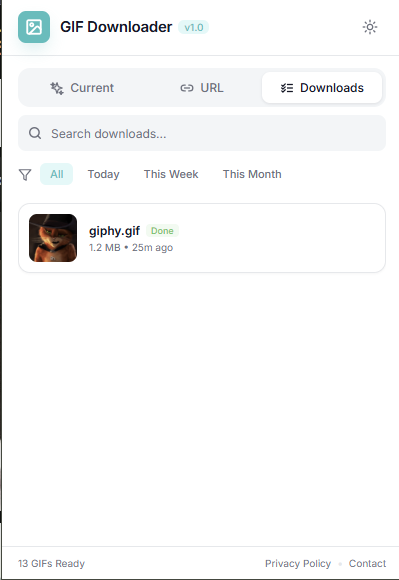
Enjoy a clean, modern, and thoughtfully designed interface that makes saving animated GIFs simple and efficient. Every part of the experience is focused on speed, ease of use, and minimal distractions, allowing you to find, preview, and download the content you need without unnecessary steps or confusion.
Automatically scan the website you are currently browsing. The extension grabs all files and groups them in a gorgeous grid layout.
v1.0.0
The tool is built around the standard GIF format, but it also handles WebP and MP4 sources since many platforms now store animations as compressed video. If you need to go the other direction, our WebP to GIF converter handles that conversion separately.
Yes. Paste any direct GIF link or the URL of a page containing one, and the tool will extract it. Direct links usually process faster since there is no page scanning involved.
Some sites disable right click saving or serve animations through scripts that prevent a normal save dialog from appearing. This is usually a front end restriction rather than an actual technical block, which is why a dedicated extraction tool can still retrieve the file.
It runs entirely in your browser. There is nothing to install, and no browser extension is required for the core downloader.
Yes, the tool supports links from Twitter, Reddit, Pinterest and similar platforms. Each one packages its media slightly differently, so if a link does not extract cleanly on the first try, check our platform specific guides such as GIFs from Pinterest.
No daily limit applies. You can run as many extractions as you need in one session.
Files save to your browser's default download folder, the same place any other file you download lands. On mobile this is usually your Files app or Photos gallery depending on your device settings.
Yes, it works in mobile browsers on both Android and iPhone. Some mobile browsers handle automatic downloads differently than desktop, so if a file does not save right away, look for a manual "save to files" option in your browser menu.
This usually means the animation is loaded dynamically after the page renders, which our scanner sometimes needs a second pass to catch. Try the direct GIF link instead if you have access to it, since that skips the page scanning step entirely.
The tool does not ask for an account, does not store the files you download, and does not run third party tracking scripts on the download process itself. Everything is processed client side in your browser.
The tool works with many publicly accessible pages. Login-walled or heavily restricted pages usually will not work. You are responsible for only downloading content you have the legal right to use, and for following each site's terms and copyright rules.
Yes, there is no paid tier, trial period, or hidden charge for using the downloader.
When the source is a real GIF, the file downloads in its original uncompressed quality. If the resulting file is too large for sharing or Discord uploads, you can use our free GIF compressor to shrink file size by up to 85% without noticeable quality loss.
Platforms like Twitter and Instagram convert GIFs into video formats automatically to save bandwidth. If you need to turn looping GIFs into clean video clips yourself, our GIF to MP4 converter handles that instantly. You can also read our guide on saving animated GIFs for more details.
Download animated GIFs, looping video pins, and MP4s from Pinterest.
Save animated GIFs and looping MP4 clips from Twitter and X posts.
Download animated GIFs, Discord custom emojis, and media attachments.
Reduce GIF file size for Discord, websites, and faster sharing.
Convert looping GIFs into compact MP4 videos in a few clicks.
Convert animated WebP images into standard GIF format.
Browse guides, tips, and tutorials about animated GIFs and media tools.
Learn how to download GIFs from publicly accessible webpage links for free.
A practical guide to saving animated GIFs from Pinterest pins.
Troubleshoot GIFs that will not play, animate, or download correctly.